The openTrans order export is used to transfer orders (ORDER documents) to heroal - Johann Henkenjohann GmbH & Co. KG.
The settings for this are largely loaded automatically according to Heroal's specifications.
First, the corresponding supplier data record must be opened in ingenious.
In the "Supplier information" tab, select Heroal from the "Automatic settings for" list.
Ckick the  button to load the openTRANS export settings.

Loading the openTrans settings for the supplier Heroal |
Individual settings are then made in the now activated "openTRANS Export" tab.

Settings openTRANS Export Heroal |
File storage
Under File Storage, activate the export for the contact.
This is also where you can specify how the export file will be made available.
You can choose between FTP, network and email.
The details must be agreed individually with Heroal.
Export settings
Depending on the type of export, different settings must be made..
via FTP-Server
| Host | Simple input field | Address of the server on which the FTP server is running |
| Login | Simple input field | FTP user login |
| Password | Simple input field | FTP user password |
| FTP subdirectory | Simple input field | Directory on the FTP server where the export file should be stored |
| SSL | Checkbox | Activation of data transfer encryption |
via network
| Export directory | Simple input field + Button | Directory on the network where the export file should be stored |
by email
| Recipient's email address | Simple input field | Email address to which the export file should be sent |
| Save successfully exported files to | Simple input field + Button | Local or network directory where the export file should be stored |
| MAPI | Checkbox | If the checkbox is activated, the email will be sent via Outlook |
XML - settings
The XML settings correspond to Heroal's specifications.
Only a few individual adjustments need to be made here.
These can be accessed via the button  and are documented below.
Heroal customer number
The Heroal customer number is to enter in the nodes
- PARTY_ID which has the type 'supplier-specific' hat and
- BUYER_IDREF
Project text on the invoice
If a project text is to be printed on the invoice, the "REMARKS" node with the type 'header' in ORDER_INFO must be activated.
Transport request
If a special transport request is required, the "REMARKS" node in ORDER_INFO must be activated with the type 'DELIVERY'.
The transport request itself must be entered in the "OpenTransBeforeExportHeroal" script (Purchase list module) in the "REMARKS" section.

Script for entering the transport request |
Mapping the item units
A mapping of the item units must also be stored in the "OpenTransBeforeExportHeroal" script (Purchase list module).
The units specified by Heroal are as follows:
| Unit | Description German | Description English |
| CMT | Zentimeter | centimetre |
| C62 | Stück | piece |
| KGM | Kilogramm | kilogram |
| LTR | Liter | liter |
| MTK | Quadratmeter | square metre |
| MMT | Millimeter | millimetre |
| MTR | Meter | metre |
| OP | 2er Pack | pack of 2 (also pair) |
| PA | Packung | packet |
The custom units defined in the Selection lists (for the purchasing module) must be assigned to the Heroal units in the script.
An assignment is required for each unit used in ingenious (if applicable to Heroal items).
In the following example the unit "piece" from ingenious is assigned to the unit "C62" according to the Heroal specification.
case "piece":
res = "C62";
break;
If the unit piece is also created with "pc"or "pce" in ingenious, these abbreviations must also be assigned to the unit "C62".
case "pc":
res = "C62";
break;
case "pce":
res = "C62";
break;
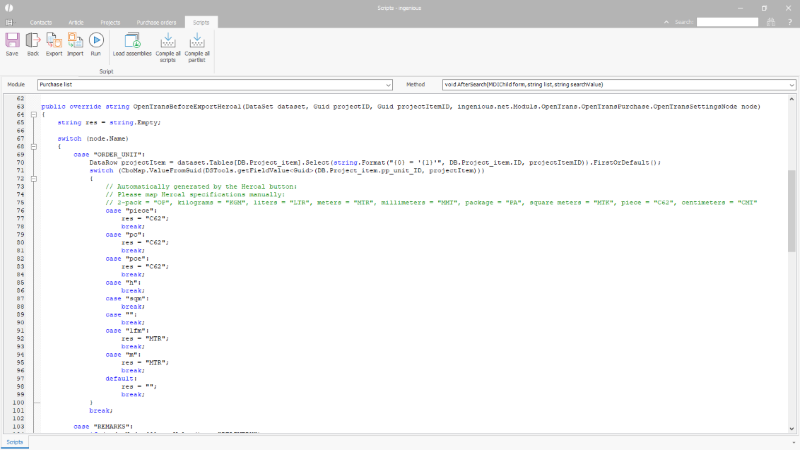
Script for the mapping of the item units |